Self-hosting of the Schedule Database
A schedule database is created in the Schichtplaner Cloud by default.
This is managed by the company RPS Planungssysteme GmbH.
Users can only access the schedules stored there via the Schichtplaner applications.
For full access to the data of a schedule, you can also store the schedule database on your own database server (self-hosting).
Note: Detailed instructions for self-hosting, including a description of the schedule database, can be found in the self-hosting manual.
For self-hosting, you need to make the appropriate settings when creating a new schedule.
Select the option The schedule data is stored on my own server (self-hosting) to display additional input fields.
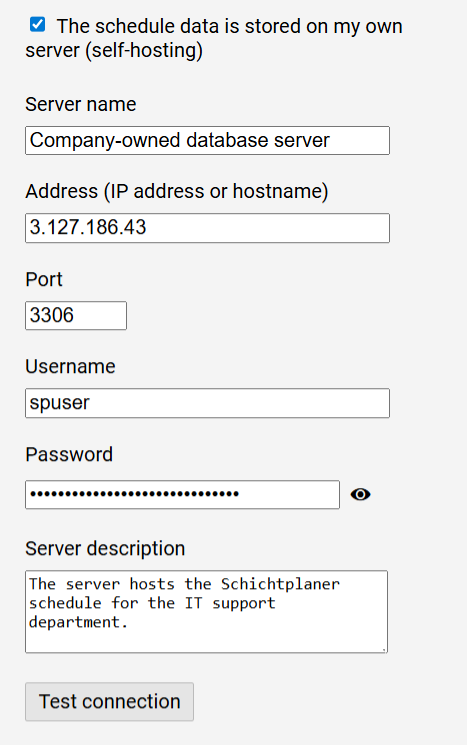
First, specify how the server, which you can optionally name, can be reached.
Enter the hostname or IP address of the server and specify the port through which the server accepts requests.
Enter the username and password of the database user who is responsible for creating, editing, and querying the schedule database on your database server.
The optional description allows you to add any further information about the self-hosting settings.
Via the button you can check if the entries are correct in order to log in to your database server with the provided user data.
The user's rights are also listed.
If the connection cannot be established, check your entries and ensure that your database server accepts requests from the Schichtplaner application server.
Notes:
-
The name of the database (schema) is set by the program and can be viewed on the editing page of the schedule after it has been created.
-
How to migrate a schedule created in the Schichtplaner Cloud to your own database server is described in the self-hosting manual.