Manage Groups
To show the administration view for groups press the button in the schedule view and select the command from the organization menu.
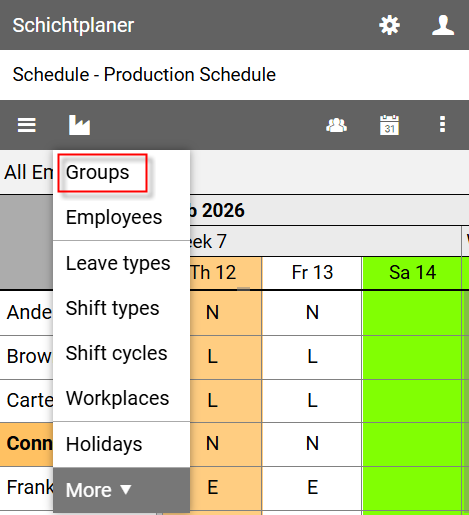
Administration View for Groups
The view lists all existing groups in a tree structure.
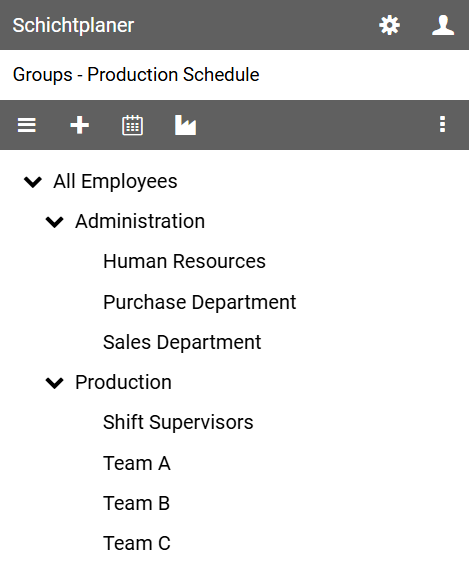
The command bar contains the following buttons:
opens the main menu with commands for editing the schedule properties, the schedule users and user rights
allows the creation of a new group
displays the schedule view
opens the organization menu with commands for setting up the schedule.
opens the view menu for further actions
Context Menu
Clicking on the name of a group opens a context menu that allows access to specific actions.
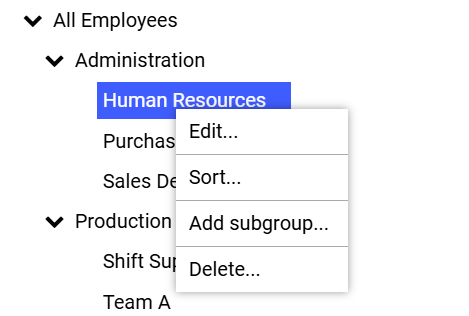
allows you to change the properties of the selected group
opens the sort view, where you can define the display order of groups that have the same parent group as the selected group
allows you to create a new group with the selected group as the parent group
removes the selected group after a security prompt.
Notes
The top group (default name All Employees) basically includes all employees.
This group cannot be deleted or moved.
If a group is deleted, the employees assigned to it are not deleted.
The same applies to the subgroups of the deleted group. These are simply moved one level up.